General discussion of SQL Topics; aimed for the novice-intermediate level Microsoft SQL Server User. Currently focuses on using SQL Server 2005.

Showing posts with label Microsoft. Show all posts

Wednesday, December 31, 2008

Updated: Search Stored Procedures for Dependencies / References

In a discussion on the MSDN Forums I had posted my original code to search a Stored Procedure (search any object within SQL really) for specific text (http://social.msdn.microsoft.com/Forums/en-US/transactsql/thread/847b421d-332d-40f8-9649-b26fc2306920). You can view my original blog post describing this code block at: http://sqln.blogspot.com/2008/10/searching-text-of-programmable-objects.html.

Adam Haines had posted a wonderful enhancement to my T-SQL code. He had returned the matching text result as an XML instead of a text, this allows the user to click on the returned text and have the resulting text appear in a new window.

The new code, with the XML returned results, is:

DECLARE @StringToSearch NVARCHAR(MAX)
SET @StringToSearch = 'ENTER_SEARCH_TEXT_HERE'

SELECT    
   
[name],   
   
(   
       
SELECT    
           
OBJECT_DEFINITION(obj2.object_id) AS [text()]   
       
from sys.all_objects obj2   
       
where obj2.object_id = obj1.object_id   
       
FOR XML PATH(''), TYPE   
   
) AS Obj_text,   
   
[type] as ObjType    
FROM sys.all_objects obj1  
WHERE OBJECT_DEFINITION(object_id([name])) LIKE '%' + @StringToSearch + '%'
--Optional to limit search results....    
--AND [is_ms_shipped] = 0 --Only search user & post SQL release objects
--Change above to 1 if want to search only Microsoft provided objects released with SQL Server
--AND [type] = 'P' --Search only Stored Procedures
--AND [type] <> 'V' --Exclude Views
--See referenced article for listing of additional object types
--http://www.sqlservercentral.com/articles/T-SQL/63471/

Thanks again for this enhancement Adam!

Until next time, Happy Coding!!!

Friday, December 12, 2008

Books Online could be better...and we, the users, already can make it better!

Yesterday, Kalen Delaney wrote a small article discussing if MS should or shouldn't build in more warning messages or taking better actions in warning users about potential problems from performing tasks/commands within SQL Server. You can read her article at: http://www.sqlmag.com/Articles/ArticleID/101033/101033.html

I agree that to a certain extent the DBA is responsible for the database and should know how to use the software thoroughly...so ideally the database would never be at an unknown risk of data loss. Unfortunately, SQL Server has jumped from the realm of an application to the realm of a data platform! This changes things quite a bit; there is no realistic expectation that a single DBA (or even a small team of DBAs) can possibly know the database software and all of its commands and internal workings 100%. So there is some portion of relief that Microsoft must provide...rather it is a method of warning the DBA from messages, errors, or warnings I don't know or speculate a foreseeable method. I do agree that Books Online (BOL) is considered the SQL Server documentation and it is Microsoft's responsibility to ensure that the documentation provides all of the information (including inner workings where necessary) of commands and features that have potential unsafe effects.

The question is where does this responsibility end? Also, where does it fall onto the DBA (or end-user) shoulders to piece together all of this information and understand how they are utilizing the data platform and the data loss potential is created by this usage?

The first thing that comes to my mind is that Microsoft has taken a step in adding a way for the user's of BOL to add in their content that can point this type of stuff out. Why is it that we DBAs aren't doing this? I hope after reading this maybe our community will take a moment or two to place a useful comment (especially warning of potential data loss areas) in BOL for the other less knowledgeable DBAs.

Until next time, Happy Coding!

Thursday, October 23, 2008

TSQL Code: Compare Tables of Databases on Separate Servers

NOTE: This script was originally developed to compare table row counts, but with the below mentioned modifications this could be helpful if you have a database that is shipped to another server and often times needs to be ETL into the other database and you are worried there may be records that aren't getting transferred properly (or at all).

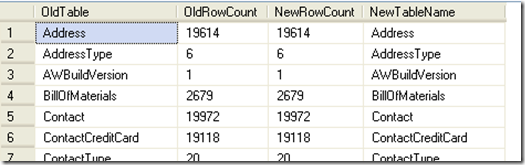
The other day I came across a question on how to compare the tables in one database to the tables in another database, this was in concerns to a migration project. This person had a database that existed on an older server running SQL 2000 and they chose to migrate their database to a new server running SQL Server 2005. They had wanted to be able to somehow be able to visually display a comparison of the two databases to prove the conversion was successful, and also to display the comparisons of the tables. Results meeting above requirements are shown in Figure 1.
AW_Compare_All 
Figure 1 (results of running sp_CompareTables_All)

In response to this I had started to develop a TSQL script that created a stored procedure that would allow you to run it from the current database and specify the location of the original database. The script would then collect the tables and count the records within each table for both databases. It will display the table names on the outside (left and right) of the results, and the record counts will be next to each other on the inside (next to their table names); which will allow for a very simple and pleasing visual comparison. I wanted, and did, avoid using cursors or other techniques that will potentially bog down the system resources (such as the stored proc 'sp_MSForEachDB' and 'sp_MSForEachTable').

Now, this is a rough draft that I had thrown together and tested over a lunch period; so, there are some issues that can still be cleaned up on the script and it lacks the ability to detect if a table exists on one database, but not the other.

At the end of the script I'll also provide a quick comment that will allow you to change the results from displaying all tables and their row counts to display only the tables with mismatched row counts (which may be useful if you want to use this script as a method to troubleshoot databases that tend to not migrate all records).

The first problem faced is how to best access the server with the original database; while there are many options I chose to use the built-in stored procedure "sp_addlinkedserver". This procedure seems to be simple to implement and allows for seamless integration into TSQL code. Testing for this script was performed on the AdventureWorks database (developed for SQL 2005) on both test systems. The 'originating' database was on a SQL 2005 instance (although testing was briefly performed on SQL 2000 and SQL 2008 to validate compatibility). The 'originating' server is called TestServer35, the database is on an instance called Dev05; the database for both instances is called AdventureWorks2005. This information becomes important when using the sp_addlinkedserver command. I used the following TSQL code:

EXEC sp_addlinkedserver   
   
@server='TestServer35-5', 
   
@srvproduct='',
   
@catalog='AdventureWorks2005',
   
@provider='SQLNCLI', 
   
@datasrc='Server35\Dev05'
 

As you can see, the linked server is referenced as TestServer35-5. We will use this reference, in a four-part identifier (Server.Catalog.Schema.Table). The next obstacle is to obtain a listing of tables and their row counts. I used a script I had modified last year to perform this since this script will run both on SQL 2005 and SQL 2000 (you can view my script on SQLServerCentral.com's Script section at: http://www.sqlservercentral.com/scripts/Administration/61766/). I then take the results of this and store them into a temporary table; I also do this for the new database (on local server where this stored proc is running at).

Then comes the simple part of joining the two temp tables into a final temp table. I chose this route because I wanted to have the two database in separate temp tables in the event I want to work with that data, which I will be working with the data in my update to determine if a table is missing from one of the databases.

Here is the TSQL code I used (remember if you want to use this you will need to change the linked server information to the correct information; as well as to create this stored proc in the appropriate database):

--Change the database name to the appropriate databse
USE [AdventureWorks2005];
GO

CREATE PROCEDURE sp_CompareTables_all
 
AS
 
 
CREATE TABLE #tblNew
( tblName varchar(50), CountRows int )

INSERT INTO #tblNew
( tblName, CountRows)
SELECT o.name AS "Table Name", i.rowcnt AS "Row Count"
FROM sysobjects o, sysindexes i
WHERE i.id = o.id
AND indid IN(0,1)
AND xtype = 'u'
AND o.name <> 'sysdiagrams'
ORDER BY o.name

CREATE TABLE #tblOLD
( tblName varchar(50), CountRows int )

INSERT INTO #tblOLD
( tblName, CountRows)
SELECT lo.name AS "Table Name", li.rowcnt AS "Row Count"
--********
--Replace TestServer35-5 and AdventureWorks2005 below with your appropriate values
--********
FROM [TestServer35-5].[AdventureWorks2005].[dbo].[sysobjects] lo, 
   
[TestServer35-5].[AdventureWorks2005].[dbo].[sysindexes] li
WHERE li.id = lo.id
AND indid IN(0,1)
AND xtype = 'u'
AND lo.name <> 'sysdiagrams'
ORDER BY lo.name

CREATE TABLE #tblDiff
( OldTable varchar(50), OldRowCount int, NewRowCount int, NewTableName varchar(50))

INSERT INTO #tblDiff
( OldTable, OldRowCount, NewRowCount, NewTableName )
SELECT ol.tblName, ol.CountRows, nw.CountRows, nw.tblName
From    #tblNew nw
JOIN #tblOLD ol
ON (ol.tblName = nw.tblName AND ol.CountRows = nw.CountRows)
        
SELECT * FROM #tblDiff
        
DROP TABLE #tblNEW
DROP TABLE #tblOLD
DROP TABLE #tblDiff


You simply execute the code with the following TSQL:

EXECUTE sp_CompareTables_All
 

The results of this script are shown in Figure 1 (above).

Now, this is great if you want to have a list that you can go through yourself to verify each table matches in row counts. But, what if that database has 1000 or more tables? What if you are just, simply put, lazy? Why not utilize SQL Server to process this information for you?

Well, I sure enough did just that. With a very small modification to this script you can easily have it only display any tables that don't match up in record counts.

All you have to do is change the INSERT INTO #tblDiff block's "ON" statement to join if the CountRows are NOT equal. The following is the modified block of code; the remaining stored procedure remains the same:

ON (ol.tblName = nw.tblName AND ol.CountRows <> nw.CountRows)
 

I did also rename the stored procedure from "sp_CompareTables_All" to "sp_CompareTables_Diff", but this is optional for your own ability to clarify which stored proc is being used.

To get some results I had made a few modifications to the AdventureWorks2005 database. I had added a couple of rows to a table, and removed some rows from two tables. The results of the stored proc showing only the different tables are shown in Figure 2.

AW_Compare_Diff
Figure 2 (results of running sp_CompareTables_Diff)

As you can see the ability to change this script to show all tables or only different tables is very simple. Even setting up this script is simple, where the hardest part of the whole thing is adding a linked server (which is fairly simple also).

In a future post I'll revisit this script and include the ability to display tables that exist on one database, but not in the other. Be sure to check back for this update.

Until next time...Happy Coding!!

Tuesday, August 12, 2008

SQL Server 2008 Officially RTM!

On August 11, 2008 Microsoft announced through their MSDN Flash newsletter that SQL Server 2008 has been RTM (Released To Manufacturing). This has been a long awaited release for many of us in the SQL community! Congratulations to Buck Woody and the many, many others on the SQL development team on this release!

While August 11, 2008 is probably the official RTM date, those of you that have an MSDN subscription may have been enjoying the RTM a week earlier (August 6th, 2008 through the MSDN Subscriptions website) as announced by Buck Woody's blog (Carpe Datum). You can view the post at: http://blogs.msdn.com/buckwoody/archive/2008/08/06/news-flass-sql-server-2008-is-here.aspx.

Undoubtedly, you can find many blogs and posts on the new features of SQL Server 2008. This looks to have a great improvement on SQL Server 2005; in just about every area. There is improvement on security, developing, and administering; to name a few. There seems to be a little bit of something for everyone to get excited about, ranging from Business Intelligence for the enterprise users to Intellisense in TSQL syntax for the programming DBA to Resource Governing for the IT Administrators.

I look forward to using SQL Server 2008, and to enjoying a little more easily administrated database with tons of new features, flexibility, and control!

Until next time...Happy Coding!

Wednesday, June 18, 2008

Listing User-Defined Stored Procedures in SQL Server 2005

You can easily obtain a listing of the User-Defined Stored Procedures that are in any of your databases. In fact, Microsoft had made this information very easily accessible. You only need to access a System Table view called "Sys.Procedures". This information may be easily accessed using a small TSQL code, such as the following...

USE [your_database_name_here];
GO
SELECT * FROM sys.procedures
ORDER BY [name];
GO

Your results will vary based on what Stored Procedures you or anyone else with access to your database have created. The following is a sample of the results I have obtained when running this code on my 'model' database.

User-Defined Stored Procedures

The most important thing to keep in mind with this TSQL code is that each database may contain different User-Defined SPs.

Do you want to get a listing of EVERY single Stored Procedure in your database(s)? If so, then be sure to check out SQLServerCentral.com for one of my upcoming articles! I'll post the direct link to the article as soon as it becomes available!

You'll want to check this article out when it is published...you'll NEVER have to search the Internet again to find out what SPs are in SQL Server 2005!! UPDATE: You can read this article on SQLServerCentral.com (http://www.sqlservercentral.com/articles/T-SQL/63471/). Please leave feedback if you have a few moments.

TIP:

Do you want all of your databases you create (from here on...not previously created databases) to use a specified stored procedure or set of stored procedures? If so, then create the desired Stored Procedure(s) in your 'model' database. Now any new databases created will get the SP(s) you created in the 'model' database because your new databases are based on the 'model' database!


-----------------------

Legal Disclaimer/Warning
Please remember that when using an SP you are not sure the outcome or effect it has should be done on test systems; never use anything that has not been thoroughly tested in a production environment. I am not encouraging you to use any type of Stored Procedures (documented or undocumented); I am only informing you of the method that can be used to obtain a listing of all procedures that are found within SQL Server 2005. Microsoft strongly states that undocumented Stored Procedures, Extended Stored Procedures, functions, views, tables, columns, properties, or metadata are NOT to be used and do not have any associated support; and Microsoft Customer Support Services will not support any databases or applications that leverage or use any undocumented entry points. Please refer to: http://msdn.microsoft.com/en-us/library/ms166021.aspx for Microsoft's legal disclaimer and further information in Microsoft's support for use of stored procedures.

Thursday, May 22, 2008

Optimizing Indexes

Summary:

Optimizing Indexes is quite a complicated subject. There are many techniques; and what is the most difficult is that there are so many different scenarios as to when and how to optimize your indexes. Instead of trying to describe a method of how to optimize, I am going to discuss how to identify when optimizing indexes should be considered and where to go to find the different options.

The first step is NOT to just rebuild all indexes, or to defrag them all. There are some people that believe that rebuilding all indexes is the way to solve this; don't listen to them!! PLEASE DON"T!!! I'm rarely the person to give advice on not listening to other people; most people can help you learn about what's good or bad...but if you go the route of rebuilding and defraging all your indexes, you can in fact be causing additional problems that you didn't have to cause. In particular using system resources that don't need to be used, and causing unneeded fragmentation on the OS level! Any decent DBA is always concerned with using system resources, remember that system resources is always a precious commodity and should never be wasted.

The first step is to analyze the database. The next step is to identify the queries that can/will benefit from optimizing the index(es). The third step is to optimize the index. The final step is to periodically review these methods to identify when optimizing indexes will be required; this will be an ongoing project and will ultimately require re-iterrating through your queries to identify when an index has become warranted for optimization. There is no cut and dry method to warn you, prevent indexes from becoming out of tune, or to auto-optimize the queries and indexes.

Analyzing the Database:

So, how do you analyze a database to determine if an index needs to be rebuilt or should run a defrag on the index? Well, first you need to understand how indexes are built and what is causing them to become fragmented. Review my blog entry "Introduction To Indexes" to learn about how indexes are built. Also, take the time to review this white paper called "Microsoft SQL Server 2000 Index Defragmentation Best Practices"; even though it is written for SQL Server 2000, it will still apply the same to SQL Server 2005. It is a long read, but will help out well beyond the scope of this blog entry.

Here, in a nutshell, is how to determine when your index is fragmented. Use SQL Profiler to identify poor performing queries; in particular use the template "SQLProfilerTSQL_Duration", this will already contain the traces needed to identify the offending queries. Once the queries are identified you can then start looking into which indexes there queries are accessing; especially queries that are retrieving ranges instead of singletons. These queries are the highest risk of having fragmented indexes, remember though that this is just a method to determine the potential problem areas. Your own judgement will be best to make the final determination.

When to Consider Optimizing Indexes:

The first key in detecting that you should optimize your index is when you are observing performance degradation and have no absolute culprit to cause this. Now, keep in mind that just because you are seeing performance degradation doesn't immediately indicate that there is index fragmentation. This can only be determined by analyzing your database properly. Next, identify which queries are utilizing the most I/O; these are the next candidates. Then consider queries that have workloads that are suspected to benefit from index defrags; this can be quite difficult and should be carefully determined.

All of these are covered in the MSDN white paper called "Microsoft SQL Server 2000 Index Defragmentation Best Practices"; mentioned earlier. This paper even goes into very good detail on how to make these determinations, which will probably be enough to get your through while you gain experience.

Getting Help:

Sometimes it's nice to have someone more experienced help out, if that is how you feel then go with that feeling and seek out that someone.

If you don't have physical access to an experienced DBA then seek advice from trusted websites, forums, and/or discussion groups. Remember when seeking advice they can only provide an answer with quality that matches the information you provided. Such as stating you have a database that needs indexes rebuilt or defragged, will most likely get you answers stating to use DBCC commands or some other commonly used index rebuilding command. The purpose of seeking advice is to provide detailed information to get an answer that is specific to your scenario; so be sure to provide as much information as possible without breaking any company policies.

Conclusion:

As you can see, Indexes can be fairly simple to optimize. It's determining when to optimize and what to optimize that becomes difficult.

There are methods to fine-tune the auto-index handling of your indexes, this is covered in the white paper I mention in the next section. You'll always find different opinions and experiences, embrace all you can and mix and match what works best for you and your situation. There is no one-size fits all for optimizing indexes, just as there isn't one-size fits all for database solutions. It's all about customizing to your needs, and utilizing your available resources to make your work easier and more enjoyable.

I can't stress enough that reading the "Microsoft SQL Server 2000 Index Defragmentation Best Practices" white paper will help out tremendously. This paper covers the topic so well, that originally I had planned on providing tips on how to identify the queries that required indexes to be rebuilt, and how to find additional help on this topic. During my research I came across this white paper and it covered absolutely everything and more than I had planned to cover!

Until next time, Happy Coding!!

Additional Resources:

Microsoft SQL Server 2000 Index Defragmentation Best Practices (http://www.microsoft.com/technet/prodtechnol/sql/2000/maintain/ss2kidbp.mspx)
SQL Server Best Practices (http://msdn.microsoft.com/en-us/sqlserver/bb671432.aspx)
How To: Optimize SQL Indexes (http://msdn.microsoft.com/en-us/library/ms979195.aspx)
Database Journal: Reducing SQL Server Index Fragmentation (http://www.databasejournal.com/features/mssql/article.php/2238211)
SQLServer Performance: SQL Server Index Fragmentation and Its Resolution (http://www.sql-server-performance.com/articles/per/index_fragmentation_p1.aspx)

Wednesday, February 20, 2008

Getting Started – Transact-SQL (T-SQL)

Overview:

This blog is aimed to help you get started using T-SQL. T-SQL is a syntax used in SQL Server; it generally composes of the majority work that is performed in the SQL database to get the data, store the data and/or work with the data. There are various other aspects of SQL Server that are used to perform many tasks that will be covered in other blogs; you'll find that in fact many of the tools used to setup new databases, new users, and other operations/tasks within SQL Server are nothing more than a nice Graphical User Interface (GUI) based on T-SQL commands.

What is T-SQL?

T-SQL, as already mentioned, is the syntax you will use to directly interact with the data stored within your database. T-SQL is typically entered via a GUI tool or application. A typical Database Administrator (DBA) might use Microsoft's SQL Server Management Studio (SSMS) or Enterprise Manager (EM) to enter T-SQL statements. A typical Database Programmer (DBP) might use a programming language such as Visual Basic or C# to enter T-SQL statements.

A common T-SQL statement used, almost in every instance of obtaining data information, is the "SELECT" statement. This statement can be a simple one or very complex. A typical usage may be:

    SELECT * FROM table1

This example would select all data from all columns from a table called "table1". This would be the simplest of all possible examples; but you aren't limited to only this single use. You can create complex SELECT statements that can calculate multiple fields and return the results, could join multiple tables, you could even join tables (or columns) from other databases!

How Do I use T-SQL?

T-SQL is used by entering a line of text within the chosen editor and then executing the command(s) within the SQL Server environment. A DBA may use SSMS to directly enter the commands within the SQL Server environment, or he/she may create a series of commands stored within a file (this is commonly referred to as a 'script') that can later be executed, or he/she may create a stored procedure that holds these commands within the SQL Server environment that can be later called by utilizing the "EXECUTE" keyword.

The important thing to know isn't how to use T-SQL; it's how to find the information to learn how to do what you want with T-SQL. I could spend this whole blog, and many more, on just how to use the SELECT statement; I could spend a lifetime blogging on how to use every T-SQL command there is within SQL Server (and before I even could get through half those commands and new version of SQL Server would appear causing us to restart the learning process!). As the famous saying goes: "Give a person a fish and they eat for a day; teach the person to fish and they eat for the rest of their lives". SQL Server is no different. So, I'm going to concentrate on how to find the information you need.

Where do I find the information I need?

This is actually quite simple to answer…the internet! But, if you want really detailed information that provides you with ALL of the information on how to use ANY (and all) T-SQL commands there is only one place you can go. NO, not this blog…you'd go straight to the horse's mouth; MSDN website. In particular you go to: Transact-SQL Reference (this URL is listed in the "Additional References" section at the end of this blog). This is the pillar to the T-SQL commands; everything starts there! When you first go there you are welcomed with a small page telling you what Transact-SQL is and how it is used; but, that's not the great part yet. The great part is (at the time of this blog) that to the left is a pane (navigation listing) that will list ALL of the T-SQL commands. You can even access other SQL Server reference information from here!

You'll also find many other additional resources on the internet. Microsoft contains a section called "Community" this will provide links to their forums, newsgroups and other websites; I highly recommend reviewing this section and discovering what is contained within these links. Outside of Microsoft there are many, many, hundreds of thousands of websites that cover SQL Server, T-SQL and/or anything to do with databases.

My favorite sites can be found in the "Resources" section of the main page of my blog; this doesn't mean I endorse or agree with these sites…I find that I frequent these sites on an almost daily basis. This listing may change and you are welcome to check back periodically. I also welcome any other suggestions of websites that you may find you can't live without..Please leave a comment to this posting and I'll be sure to make it available to all of the readers.

What books, training or other materials do you suggest?

Well, that is very objectionable. There seems to be no one book that covers all topics; most books targeted at beginner/intermediate users will focus on most popular areas of SQL Server and a good book will make you aware of other areas that exist but are not covered by that book. In regards to T-SQL in particular, I'd recommend for the beginning user to get a book such as SAMS 'Teach yourself Microsoft SQL Server T-SQL in 10 minutes'; this covers the most commonly used T-SQL commands and leads you progressively with each lesson.

I, personally, enjoy the Microsoft Press series for detailed information if I know a particular subject I want to learn about. I also have found that SAMS has other titles that cover a large spectrum of topics and are usually worth looking into.

It all comes down to taste, objective and personal preference. I still, without any doubt, always recommend keeping Books Online handy and using the MSDN website; you'll find most of the answers right there already; the answers you don't find can usually be asked (and receive quick responses) in the forums within the MSDN website.

Conclusion:

There is no single source of reference or answer for SQL Server; you will find that Microsoft has gone to great lengths to provide you with the knowledge and means to gain the knowledge to use SQL Server. If you find that Microsoft doesn't offer what you need then there are many other sites readily available to provide you with that information. Learning is everything!

Additional References

Transact-SQL Reference: http://msdn2.microsoft.com/en-us/library/ms189826.aspx

Tuesday, February 19, 2008

Welcome to SQL ‘N

This blog is intended to discuss topics that may be helpful and/or interesting to the beginning and intermediate Microsoft SQL Server user. It primarily focuses on SQL Server 2005 (as that is the currently available optimal…main stream…version offered by Microsoft). This blog may change its platform focus, or support both platforms, as SQL Server 2008 nears being released to the general public.

Please feel free to leave any comments, suggestions or requests for topic discussions. This is to help you (and me) to learn more about the technology we use to store our data!

Enjoy your visit!