General discussion of SQL Topics; aimed for the novice-intermediate level Microsoft SQL Server User. Currently focuses on using SQL Server 2005.

Showing posts with label Article. Show all posts

Tuesday, January 6, 2009

New Article: Transaction Log Growth, do you need it?

Yesterday, SQL Server Central had published another article of mine: "Transaction Log Growth, do you need it?". It got some good reviews, and just over 8,000 views before 9 AM; I've been told anything over 4,000 views (total) is pretty good.

Be sure to look it over when you have a chance, it may prove helpful in the future or just might provide you a little more insight about Transaction Logs and how they work with SQL Server and your databases.

Until next time, Happy Coding!!!


References:

Article: http://www.sqlservercentral.com/articles/Transaction+Log/65255/
Discussion: http://www.sqlservercentral.com/Forums/Topic629390-1157-1.aspx

Wednesday, December 31, 2008

Updated: Search Stored Procedures for Dependencies / References

In a discussion on the MSDN Forums I had posted my original code to search a Stored Procedure (search any object within SQL really) for specific text (http://social.msdn.microsoft.com/Forums/en-US/transactsql/thread/847b421d-332d-40f8-9649-b26fc2306920). You can view my original blog post describing this code block at: http://sqln.blogspot.com/2008/10/searching-text-of-programmable-objects.html.

Adam Haines had posted a wonderful enhancement to my T-SQL code. He had returned the matching text result as an XML instead of a text, this allows the user to click on the returned text and have the resulting text appear in a new window.

The new code, with the XML returned results, is:

DECLARE @StringToSearch NVARCHAR(MAX)
SET @StringToSearch = 'ENTER_SEARCH_TEXT_HERE'

SELECT    
   
[name],   
   
(   
       
SELECT    
           
OBJECT_DEFINITION(obj2.object_id) AS [text()]   
       
from sys.all_objects obj2   
       
where obj2.object_id = obj1.object_id   
       
FOR XML PATH(''), TYPE   
   
) AS Obj_text,   
   
[type] as ObjType    
FROM sys.all_objects obj1  
WHERE OBJECT_DEFINITION(object_id([name])) LIKE '%' + @StringToSearch + '%'
--Optional to limit search results....    
--AND [is_ms_shipped] = 0 --Only search user & post SQL release objects
--Change above to 1 if want to search only Microsoft provided objects released with SQL Server
--AND [type] = 'P' --Search only Stored Procedures
--AND [type] <> 'V' --Exclude Views
--See referenced article for listing of additional object types
--http://www.sqlservercentral.com/articles/T-SQL/63471/

Thanks again for this enhancement Adam!

Until next time, Happy Coding!!!

Thursday, October 23, 2008

TSQL Code: Compare Tables of Databases on Separate Servers

NOTE: This script was originally developed to compare table row counts, but with the below mentioned modifications this could be helpful if you have a database that is shipped to another server and often times needs to be ETL into the other database and you are worried there may be records that aren't getting transferred properly (or at all).

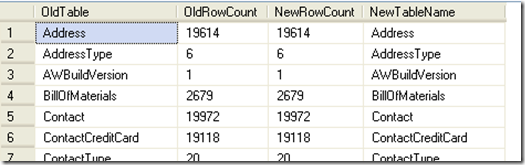
The other day I came across a question on how to compare the tables in one database to the tables in another database, this was in concerns to a migration project. This person had a database that existed on an older server running SQL 2000 and they chose to migrate their database to a new server running SQL Server 2005. They had wanted to be able to somehow be able to visually display a comparison of the two databases to prove the conversion was successful, and also to display the comparisons of the tables. Results meeting above requirements are shown in Figure 1.
AW_Compare_All 
Figure 1 (results of running sp_CompareTables_All)

In response to this I had started to develop a TSQL script that created a stored procedure that would allow you to run it from the current database and specify the location of the original database. The script would then collect the tables and count the records within each table for both databases. It will display the table names on the outside (left and right) of the results, and the record counts will be next to each other on the inside (next to their table names); which will allow for a very simple and pleasing visual comparison. I wanted, and did, avoid using cursors or other techniques that will potentially bog down the system resources (such as the stored proc 'sp_MSForEachDB' and 'sp_MSForEachTable').

Now, this is a rough draft that I had thrown together and tested over a lunch period; so, there are some issues that can still be cleaned up on the script and it lacks the ability to detect if a table exists on one database, but not the other.

At the end of the script I'll also provide a quick comment that will allow you to change the results from displaying all tables and their row counts to display only the tables with mismatched row counts (which may be useful if you want to use this script as a method to troubleshoot databases that tend to not migrate all records).

The first problem faced is how to best access the server with the original database; while there are many options I chose to use the built-in stored procedure "sp_addlinkedserver". This procedure seems to be simple to implement and allows for seamless integration into TSQL code. Testing for this script was performed on the AdventureWorks database (developed for SQL 2005) on both test systems. The 'originating' database was on a SQL 2005 instance (although testing was briefly performed on SQL 2000 and SQL 2008 to validate compatibility). The 'originating' server is called TestServer35, the database is on an instance called Dev05; the database for both instances is called AdventureWorks2005. This information becomes important when using the sp_addlinkedserver command. I used the following TSQL code:

EXEC sp_addlinkedserver   
   
@server='TestServer35-5', 
   
@srvproduct='',
   
@catalog='AdventureWorks2005',
   
@provider='SQLNCLI', 
   
@datasrc='Server35\Dev05'
 

As you can see, the linked server is referenced as TestServer35-5. We will use this reference, in a four-part identifier (Server.Catalog.Schema.Table). The next obstacle is to obtain a listing of tables and their row counts. I used a script I had modified last year to perform this since this script will run both on SQL 2005 and SQL 2000 (you can view my script on SQLServerCentral.com's Script section at: http://www.sqlservercentral.com/scripts/Administration/61766/). I then take the results of this and store them into a temporary table; I also do this for the new database (on local server where this stored proc is running at).

Then comes the simple part of joining the two temp tables into a final temp table. I chose this route because I wanted to have the two database in separate temp tables in the event I want to work with that data, which I will be working with the data in my update to determine if a table is missing from one of the databases.

Here is the TSQL code I used (remember if you want to use this you will need to change the linked server information to the correct information; as well as to create this stored proc in the appropriate database):

--Change the database name to the appropriate databse
USE [AdventureWorks2005];
GO

CREATE PROCEDURE sp_CompareTables_all
 
AS
 
 
CREATE TABLE #tblNew
( tblName varchar(50), CountRows int )

INSERT INTO #tblNew
( tblName, CountRows)
SELECT o.name AS "Table Name", i.rowcnt AS "Row Count"
FROM sysobjects o, sysindexes i
WHERE i.id = o.id
AND indid IN(0,1)
AND xtype = 'u'
AND o.name <> 'sysdiagrams'
ORDER BY o.name

CREATE TABLE #tblOLD
( tblName varchar(50), CountRows int )

INSERT INTO #tblOLD
( tblName, CountRows)
SELECT lo.name AS "Table Name", li.rowcnt AS "Row Count"
--********
--Replace TestServer35-5 and AdventureWorks2005 below with your appropriate values
--********
FROM [TestServer35-5].[AdventureWorks2005].[dbo].[sysobjects] lo, 
   
[TestServer35-5].[AdventureWorks2005].[dbo].[sysindexes] li
WHERE li.id = lo.id
AND indid IN(0,1)
AND xtype = 'u'
AND lo.name <> 'sysdiagrams'
ORDER BY lo.name

CREATE TABLE #tblDiff
( OldTable varchar(50), OldRowCount int, NewRowCount int, NewTableName varchar(50))

INSERT INTO #tblDiff
( OldTable, OldRowCount, NewRowCount, NewTableName )
SELECT ol.tblName, ol.CountRows, nw.CountRows, nw.tblName
From    #tblNew nw
JOIN #tblOLD ol
ON (ol.tblName = nw.tblName AND ol.CountRows = nw.CountRows)
        
SELECT * FROM #tblDiff
        
DROP TABLE #tblNEW
DROP TABLE #tblOLD
DROP TABLE #tblDiff


You simply execute the code with the following TSQL:

EXECUTE sp_CompareTables_All
 

The results of this script are shown in Figure 1 (above).

Now, this is great if you want to have a list that you can go through yourself to verify each table matches in row counts. But, what if that database has 1000 or more tables? What if you are just, simply put, lazy? Why not utilize SQL Server to process this information for you?

Well, I sure enough did just that. With a very small modification to this script you can easily have it only display any tables that don't match up in record counts.

All you have to do is change the INSERT INTO #tblDiff block's "ON" statement to join if the CountRows are NOT equal. The following is the modified block of code; the remaining stored procedure remains the same:

ON (ol.tblName = nw.tblName AND ol.CountRows <> nw.CountRows)
 

I did also rename the stored procedure from "sp_CompareTables_All" to "sp_CompareTables_Diff", but this is optional for your own ability to clarify which stored proc is being used.

To get some results I had made a few modifications to the AdventureWorks2005 database. I had added a couple of rows to a table, and removed some rows from two tables. The results of the stored proc showing only the different tables are shown in Figure 2.

AW_Compare_Diff
Figure 2 (results of running sp_CompareTables_Diff)

As you can see the ability to change this script to show all tables or only different tables is very simple. Even setting up this script is simple, where the hardest part of the whole thing is adding a linked server (which is fairly simple also).

In a future post I'll revisit this script and include the ability to display tables that exist on one database, but not in the other. Be sure to check back for this update.

Until next time...Happy Coding!!

Wednesday, July 2, 2008

Publication: Introduction to the Transaction Log...

Today SQLServerCentral.com (SSC) had published my article that introduces the Transaction Log. The primary purpose of this article was to help the newer DBAs understand how the transaction log works, and to clarify some commonly misunderstood parts of maintaining the transaction log.

This article covers a very broad and general introduction; including how the log is filled by SQL Server, easy to follow analogies to help grasp how transaction logs work with SQL Server, and some Good Practices to use when Transaction Logs are in use by SQL Server.

You can read the entire article at: http://www.sqlservercentral.com/articles/Design+and+Theory/63350/

Please feel free to join in the discussion for this article; there are some great posts that help to further clarify the topic and also provides additional information that was not included with this article. You can join the discussion at: http://www.sqlservercentral.com/Forums/FindPost527448.aspx.

Wednesday, June 18, 2008

Listing User-Defined Stored Procedures in SQL Server 2005

You can easily obtain a listing of the User-Defined Stored Procedures that are in any of your databases. In fact, Microsoft had made this information very easily accessible. You only need to access a System Table view called "Sys.Procedures". This information may be easily accessed using a small TSQL code, such as the following...

USE [your_database_name_here];
GO
SELECT * FROM sys.procedures
ORDER BY [name];
GO

Your results will vary based on what Stored Procedures you or anyone else with access to your database have created. The following is a sample of the results I have obtained when running this code on my 'model' database.

User-Defined Stored Procedures

The most important thing to keep in mind with this TSQL code is that each database may contain different User-Defined SPs.

Do you want to get a listing of EVERY single Stored Procedure in your database(s)? If so, then be sure to check out SQLServerCentral.com for one of my upcoming articles! I'll post the direct link to the article as soon as it becomes available!

You'll want to check this article out when it is published...you'll NEVER have to search the Internet again to find out what SPs are in SQL Server 2005!! UPDATE: You can read this article on SQLServerCentral.com (http://www.sqlservercentral.com/articles/T-SQL/63471/). Please leave feedback if you have a few moments.

TIP:

Do you want all of your databases you create (from here on...not previously created databases) to use a specified stored procedure or set of stored procedures? If so, then create the desired Stored Procedure(s) in your 'model' database. Now any new databases created will get the SP(s) you created in the 'model' database because your new databases are based on the 'model' database!


-----------------------

Legal Disclaimer/Warning
Please remember that when using an SP you are not sure the outcome or effect it has should be done on test systems; never use anything that has not been thoroughly tested in a production environment. I am not encouraging you to use any type of Stored Procedures (documented or undocumented); I am only informing you of the method that can be used to obtain a listing of all procedures that are found within SQL Server 2005. Microsoft strongly states that undocumented Stored Procedures, Extended Stored Procedures, functions, views, tables, columns, properties, or metadata are NOT to be used and do not have any associated support; and Microsoft Customer Support Services will not support any databases or applications that leverage or use any undocumented entry points. Please refer to: http://msdn.microsoft.com/en-us/library/ms166021.aspx for Microsoft's legal disclaimer and further information in Microsoft's support for use of stored procedures.

Monday, April 21, 2008

A brief introduction to Transaction Logs

Note: This entire article has been published by SQLServerCentral.com. Please find the link to the article at the end of this blog in the "Update" section.

Summary:

This is a very brief introduction to transaction logs. I am currently working on an article (titled "Introduction to the Transaction Log") that will go into a lot of detail, show the ‘ins’ and ‘outs’, and also discuss some ‘good practices’ (and how truncating works). This blog will just give you a basic introduction that discusses what a transaction log is, how it basically works, and what the primary use of the transaction log is (these can be more than just used for backup/restore procedures; that will be discussed in my upcoming article).

What a transaction log is:

Every single database MUST have at least one transaction log. A database can have more than one transaction log. A transaction log can be used over multiple physical files.

A transaction log is a log file (physical and virtual) that records each and every transaction that occurs. This includes data modifications, database modifications, and rollback (restoring) modifications. This file records each transaction in sequence using a Log Sequence Number (LSN). Each transaction is appended to the end of the physical log file and always uses a LSN that is higher in value than the last written LSN. These are best thought of as a journal entry for every action that occurs within your database.

Some of the operations that are recorded within the transaction log are data modifications, database modifications, rollback modifications, the start/end of a transaction, and even creating/dropping of tables and indexes.

Logical Architecture (concept):

Transaction logs operate as if they are being stored with a string of log records. Each record is identified by an LSN. The steps used to recover data can differentiate on how the data is logged within the transaction log (this is covered further in my article). Each transaction reserves enough space to support a successful rollback, either by an explicit action requesting the rollback or from an error occurring within the database. This amount of space can vary; however, it typically mirrors the amount of space that is used to store the logged operation. Transaction logs are loaded into a virtual log; this cannot be controlled or set by the administrator (my article will include a ‘good practice’ to help prevent system performance decreases from Virtual Logs).

Physical Architecture (concept):

Transaction logs can span multiple physical files. You can truncate the transaction log to free internal log space (this will not shrink the log file; I’ll cover shrinking the log file in my article). The basic concept of the physical file is it will append to the end of the log file, once the physical end of the log is reached the transactions will wrap around to the beginning of the log file (assuming there is free space).

If the log file does not contain any free space (internally); there are two possible outcomes:

1) If FILEGROWTH is enabled and there is free disk space on the hard drive, the file will automatically increase in accordance to the settings and then will re-organize the transaction log and append the new record to the end of the log, OR

2) If FILEGROWTH is NOT enabled, or there is NOT enough free disk space on the hard drive, then SQL Server will return a 9002 error code.

Primary Use of a Transaction Log:

A transaction log is typically used to allow recovery of a database to a certain point in time; or to allow the recovery of a database to the last successful transaction committed prior to the database failure. The usage of the transaction log will greatly depend on how the database recovery model is setup and the backup plan that is used.

Additional Notes:

Transaction logs should be periodically backed up. The size of the log is typically recommended to be about 1 ½ the size of your database. Example: If your database is 10 MB in size, then the transaction log would be about 15MB in size. This should be treated as a very general recommendation; there are many instances where this formula is not appropriate and should be modified to the appropriate amount based on your particular situation.

You want to ensure the transaction log is the proper size (the expected ending size) and has a relatively large growth increment value. This will provide you with the best performance and can ensure the proper use of the transaction log (much less likely to have the log expand without your knowledge of the event occurring).

Conclusion:

Transaction logs are a very important aspect of maintaining and recovering your database. If set properly, and maintained properly, they can give you the additional backup support you need without impacting system performance. They can help to give you peace of mind during daily operations. They can be an integral file to recovering a database to a point in time.

Additional Resources:

MSDN: Introduction to Transaction Logs (http://msdn2.microsoft.com/en-us/library/ms190925.aspx)
MSDN: Transaction Log Logical Architecture (http://msdn2.microsoft.com/en-us/library/ms180892.aspx)
MSDN: Transaction Log Physical Architecture (http://msdn2.microsoft.com/en-us/library/ms179355.aspx)

Update:

Posted on 7/2/08 by James:

SQLServerCentral.com has published the article in full. You can read the article at: http://www.sqlservercentral.com/articles/Design+and+Theory/63350/. You can join the discussion of this article at: http://www.sqlservercentral.com/Forums/FindPost527448.aspx. I hope you enjoy the article and find it helpful!